Tuesday, September 8, 2026
A minimum nights relaxation change that can win you last-minute bookings


Product Update
A small calendar fix that can win you last-minute bookings.
Hello Thinkers!
Two things as a takeaway from this blog: First, a change to the relaxation rules for a minimum nights through restriction. Second, a refresher on the difference between minimum nights on arrival and minimum nights through.
What changed
Because minimum nights through restrictions look at days both before and after the date on your availability calendar, the nights before the minimum nights through date also count. Previously, open nights that had already passed counted as usable, so a night like Saturday, with Sunday booked and Friday already gone by, stayed unsellable even though no guest could arrive in the past.
The result was dead inventory treated as live. A night sitting right next to today, with a booking just ahead of it, stayed unsellable because the system still believed the minimum night through could be met using nights nobody could book.
Now, only tonight and future nights count toward the minimum nights under the restriction. Elapsed nights count as blocked, and nights boxed in near today relax the way they always should have.
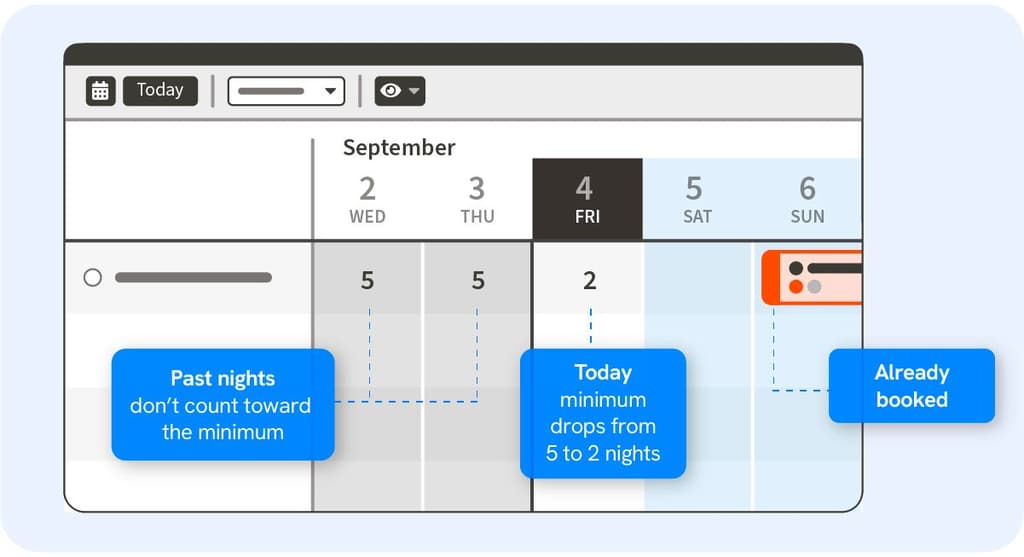
A 5-night minimum through is set Monday through Wednesday. Today is Wednesday; Friday is already booked, and Monday and Tuesday have passed. Wednesday and Thursday are the only bookable nights left, so today's minimum through relaxes to 2.
What this could mean to you
Your property could now accept last-minute one-night bookings on nights that used to sit empty alongside a reservation. That is revenue previously left on the table, and it requires no setup on your end. This applies everywhere effective restrictions are used, including your booking engine and your OTA channel feeds.
See it in your own calendar
Above your reservation calendar, click the Eyeball Icon and turn on Show Restrictions and Minimum Nights. Your calendar now shows the minimum night restrictions with any relaxation rules — what a guest will actually have to book. It is the fastest way to see where a minimum has relaxed, and where one is still holding a night you would rather sell.
If the difference between the two minimum night restrictions has ever tripped you up, you're in good company. Next is a refresher on how each one works today.
Refresher: Two kinds of minimum nights
Most systems give you one kind of minimum night restriction. With ThinkReservations, you have two types of minimum night restrictions, and knowing which one to apply is the difference between protecting a holiday weekend (for example) and accidentally locking up a night you would happily have sold.
Both types of minimum night restrictions relax automatically when the minimum cannot be met, and both tighten back up when a cancellation makes those nights available again. You never have to reset them by hand.
Minimum nights on arrival — looks forward only
This one applies only when a guest arrives that night, and it only counts nights going forward on your reservation calendar.
Set Friday to a 2-night minimum on arrival, and a guest arriving on Friday must book Friday and Saturday. If Saturday is already reserved in that room, staying two nights is impossible, so the restriction relaxes to one night, and the room can be booked for a single night. If that Saturday reservation is canceled, Friday reverts to a 2-night minimum.
Minimum nights through — looks backward and forward
This one applies to any stay that includes that night, regardless of the day the guest arrives. It can be satisfied by nights before, nights after, or a combination of both on your reservation calendar.
Set Friday to a 3-night minimum through, and a guest asking for Thursday and Friday needs one more night on either end. Because it looks both ways, it relaxes only when the night is blocked on both sides — and it relaxes to the longest possible stay. If Wednesday and Saturday are both reserved, only Thursday and Friday are left, so Friday's minimum drops to 2. If Thursday and Saturday are both reserved, Friday stands alone, and the minimum drops to 1. As soon as a cancellation makes three consecutive nights possible again, Friday returns to its full 3-night minimum.
[Callout Box] Set either a minimum nights on arrival or a minimum nights through on any given night, not both. If both are set on the same block, the minimum nights through restriction takes precedence over the minimum nights on arrival restriction.
Want more control?
If you never want minimum night restrictions relaxed, go to Settings, click Rate Type, and select a rate type. On the Details tab, under Restrictions, check "Do not automatically relax minimum nights when they cannot be met." This turns off automatic relaxation rules for that rate type altogether, so your minimum nights restrictions are always enforced as you set them.
[Callout Box] It is worth noting that this is stricter than what you had before this change — it prevents relaxation across your calendar for that rate type, not just near today.
If you never want same-day reservations, go to Booking Engine Settings and set the minimum notice for online bookings to 1 day or more.
Get your questions answered
The Support Center walks through both minimum night restrictions with calendar examples, and there is a short video if you would rather watch than read.
Related