
Tuesday, December 16, 2025
ThinkGrowth recap: ThinkReservation's new features and tools for independent properties


We just wrapped up our first-ever ThinkGrowth conference, and we are so thankful for everyone who showed up live, asked questions, and is now watching the replays! Seeing innkeepers and B&B owners connect in real time was a wonderful reminder of how strong this community is.
Across the sessions, we heard the same themes on repeat. Teams are stretched. Guests expect faster answers and smoother digital experiences. Operations feel more complex, even as you work to protect profit and keep every stay personal.
The new product releases we announced at ThinkGrowth were built directly in response to your feedback and requests. Each one is designed to simplify daily work, support your staff, and help independent properties thrive in a rapidly changing hospitality landscape.
In case you missed ThinkGrowth, here’s a closer look at what’s launching at ThinkReservations.
Front Desk Tool
The Front Desk Tool is our redesigned Front Desk page, designed to allow your team to see everything that matters for today in one place. Instead of clicking between reports, your staff gets a clear, real-time snapshot of the property.
At a glance, the Front Desk Dashboard helps your team quickly answer:
- What is the current housekeeping status of each room?
- Who is in which room right now?
- Which reservations are arriving today, and at what time?
- Which rooms are actually ready for check-in?
- Which reservations are scheduled to depart, and which departures still have a balance?
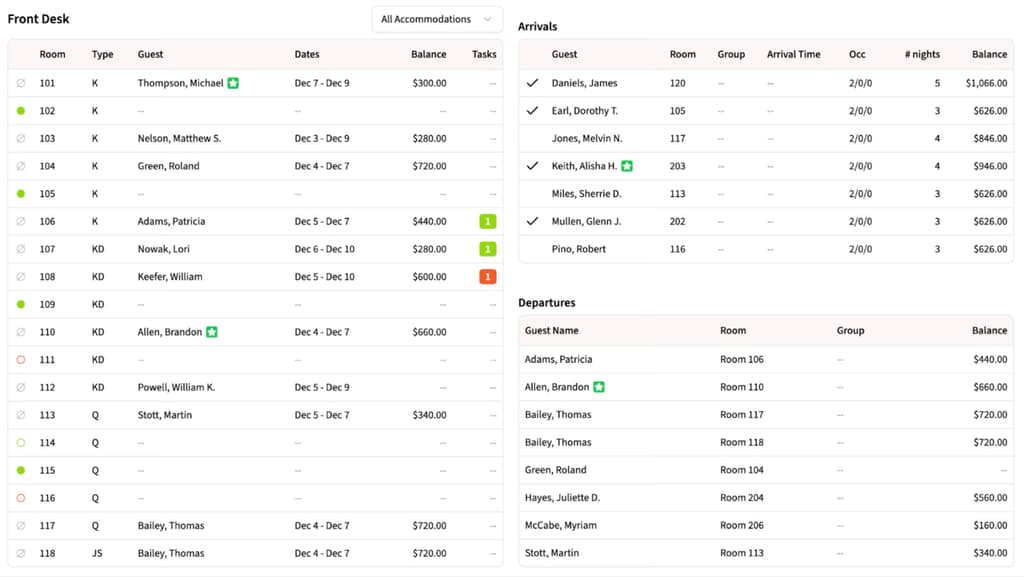
Rooms, arrivals, and departures update as your team works, so when a guest walks in or calls, your staff can respond with confidence and keep the day moving smoothly.
Housekeeping Module
Our new Housekeeping Module is built to answer the daily question: What needs to be cleaned, by whom, and when?
With the new Housekeeping Dashboard, you can view the status of every room at a glance, identify the required service for the day, determine who is assigned to it, and track the progress of the work.
Rooms move through clear stages: Dirty, Cleaning, Clean, Inspecting, and Inspected, so there is no guessing about what is actually ready.
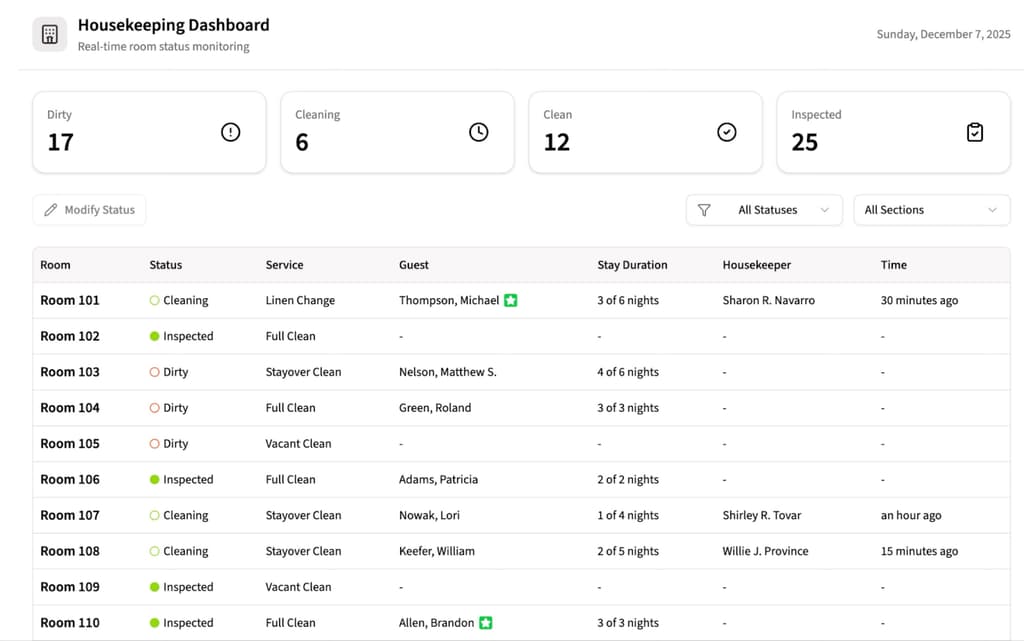
Managers can quickly assign rooms, common areas, and daily work across the team, then review schedules by housekeeper or by section.
Housekeepers manage their tasks from a phone or tablet, start and complete cleans, and add photos or notes as they go. As they update their progress, room status automatically stays in sync with the Front Desk Tool, so everyone sees the same real-time picture without extra check-ins.
Updates to Tasks
Tasks have always been part of ThinkReservations, but they now do a lot more heavy lifting for your team. Every task can move through clear statuses (like ready, in progress, completed, or do not disturb), so you always know what has been done and what still needs attention.
Staff can also attach notes and photos to any task, whether it is a maintenance issue, a special setup, or a housekeeping follow-up. If you choose to sync tasks with the Housekeeping Module, those updates will also flow into your room status, providing a connected view of the work happening across your property.
Dynamic Email Templates
Dynamic Email Templates give you a smarter way to personalize guest communication without having to create dozens of separate messages. Instead of building one confirmation for OTAs, another for direct bookings, and another for special packages, you create a single template that adjusts itself based on each reservation.
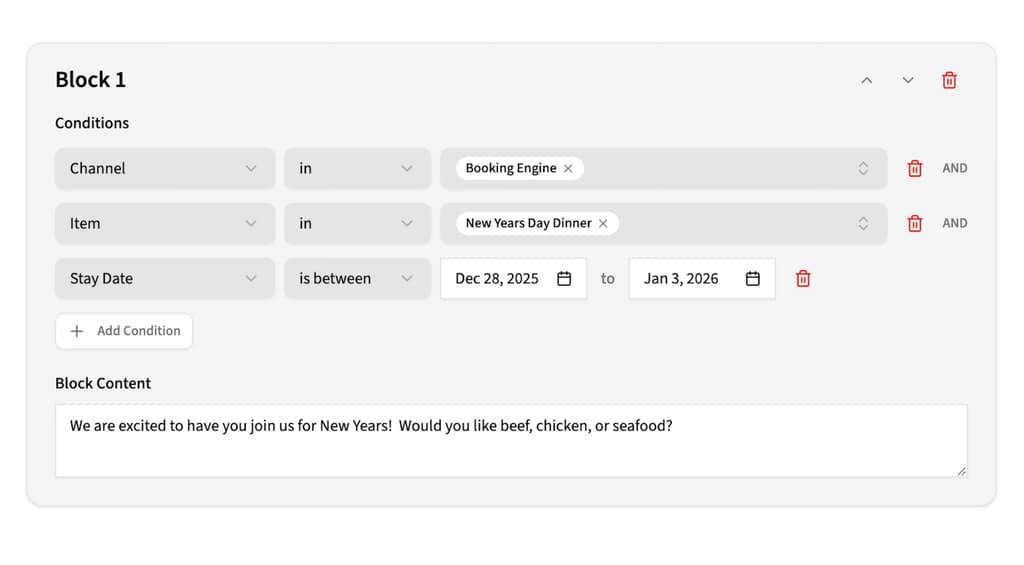
You can show different blocks of text depending on booking channel, room type, rate type, booking date, or stay dates. That means OTA guests can see one set of details, direct bookers another, and seasonal stays can get special instructions, all from the same base email.
This same logic now powers templates in ThinkMessenger as well, so your texts can be just as targeted. The result is fewer templates to manage, more relevant messages for guests, and a communication strategy that scales with your property instead of adding more work.
ThinkMessenger AI Button
The ThinkMessenger AI Button is built to help your team answer guest texts faster, without losing the human touch. When a message comes in, staff can click the robot AI 🤖 icon and get a suggested reply that is tailored to that specific conversation.
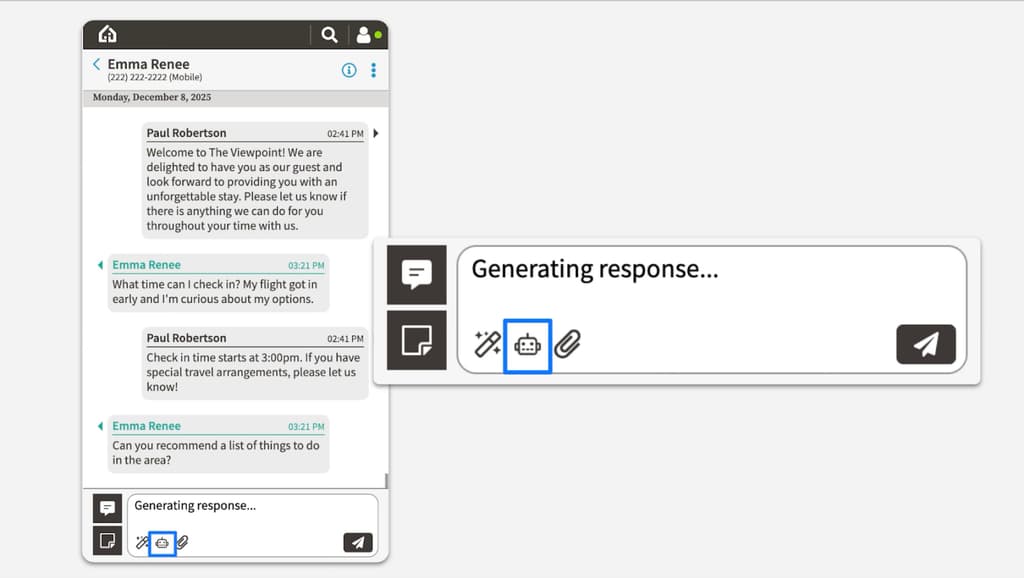
Here’s what it does for you:
- Speeds up replies: Drafts a response in seconds, so your front desk is not typing the same answers over and over.
- Uses real context: Pulls from the existing message thread and your property details to keep answers accurate and relevant.
- Supports your voice: Staff can review, edit, or personalize the draft before sending, so every reply still feels like you.
It’s not meant to replace your team; it is there to ease the pressure during busy moments and keep guest communication clear, consistent, and timely.
Banned Customers
Most of the time, guests are wonderful. But every property occasionally has a stay that crosses a line, and many of you told us you need a clear, consistent way to prevent certain guests from returning. The Banned Customer feature lets you quietly flag a guest profile so they cannot book online again using the same email or phone number.
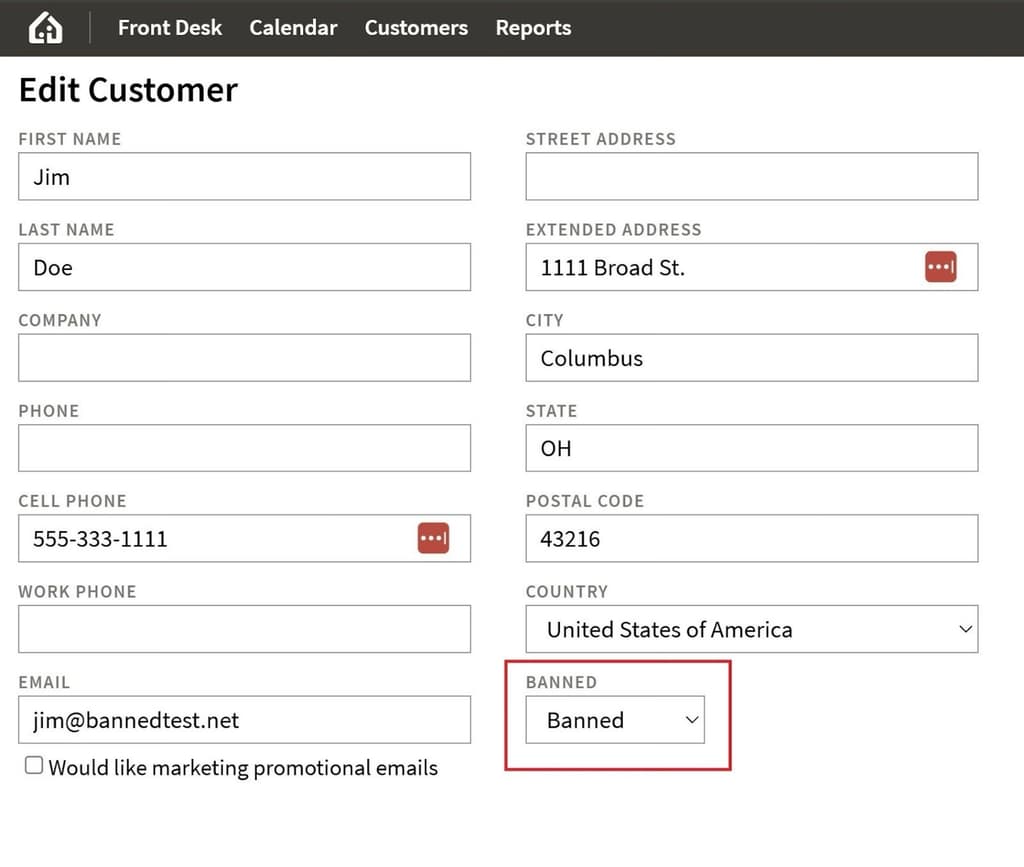
Here is how it behaves across channels:
- Booking engine: If a banned guest tries to book directly on your site, the system blocks the reservation and shows a standard message inviting them to look for other accommodations.
- OTAs: If a banned guest books through an OTA, the reservation still imports, but your team receives an email alert, allowing you to review and decide how to proceed.
- Phone reservations: If staff add a banned profile to a new reservation, a clear “no entry” icon appears next to the guest’s name, signaling extra caution while still allowing you to complete the booking if needed.
When a banned guest attempts to book on your site, they will see a simple message informing them that they are not eligible to stay at your property and encouraging them to find alternative accommodations in the area. There is no argument, no back and forth, just a clear boundary.
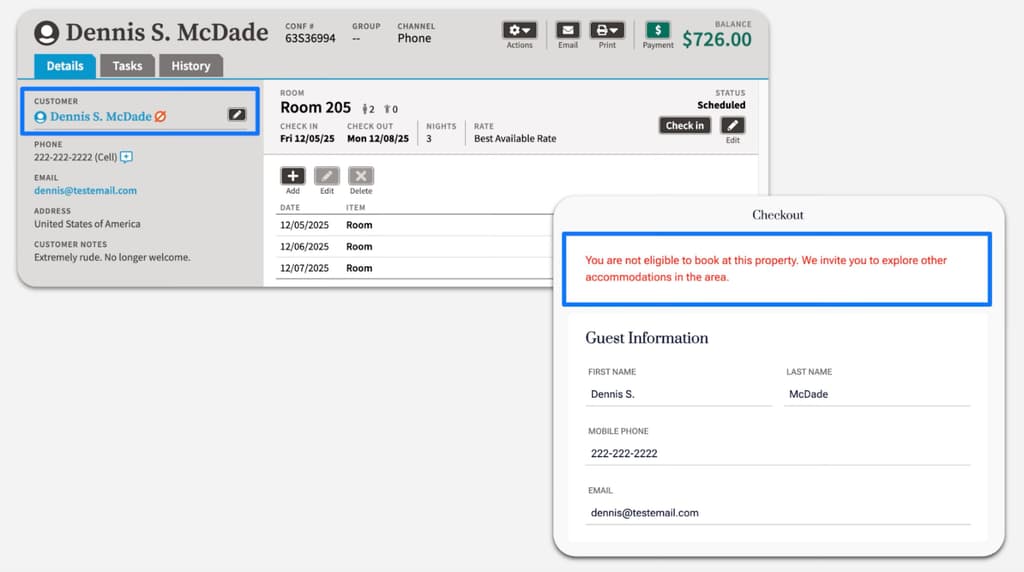
This control came directly from your feedback. It provides a professional and discreet way to protect your property and staff while continuing to welcome guests who respect your space.
Do Not Text/Do Not Email
Sometimes, you have a reservation where automated messages are not a good fit, such as when planning a surprise or managing a sensitive situation. The “Do not send automatic communications” checkbox allows you to pause automations for a single reservation without affecting any other settings in your account.
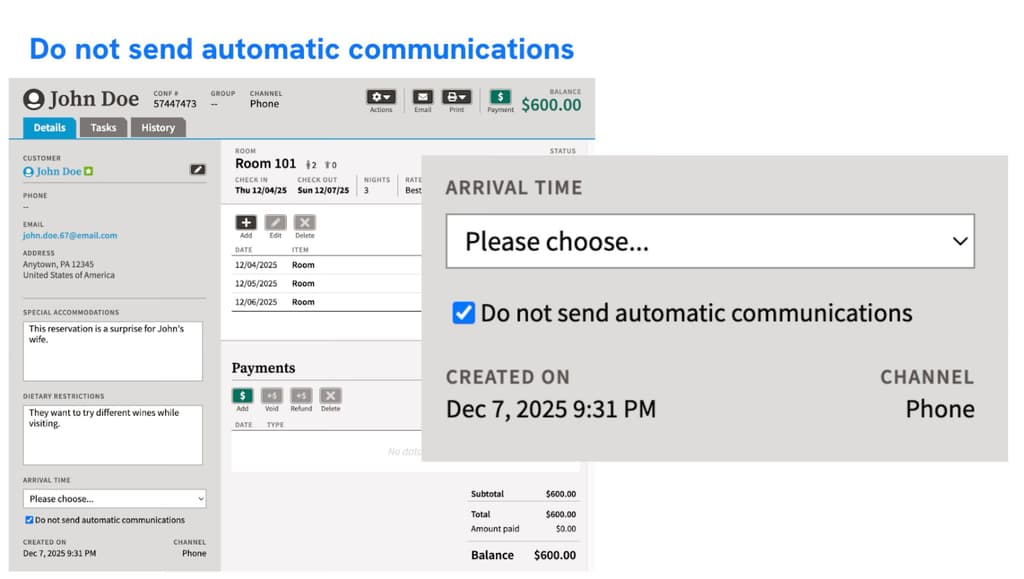
When this box is checked, automatic emails and texts for that reservation are paused, but you can still send messages manually if needed. The setting applies per reservation, not per guest, so you stay in complete control of when communication should be quiet and when it should stay on autopilot.
Rate Type Date Filters
Pricing is only powerful if it is available at the right time. Rate Type Date Filters give you precise control over when a rate can be booked, without constantly changing pricing or creating workarounds.
With date filters, you can:
- Create rolling offers: Set a sliding window so a rate is only available for stays within a certain number of days from today. This is perfect for last-minute deals or early-booker specials.
- Limit rates to specific seasons: Offer a rate only for selected date ranges, such as holiday packages or event weekends, while maintaining your core pricing.
- Block dates for specific rates: Add blackout dates when you do not want a rate to appear, even if pricing exists.
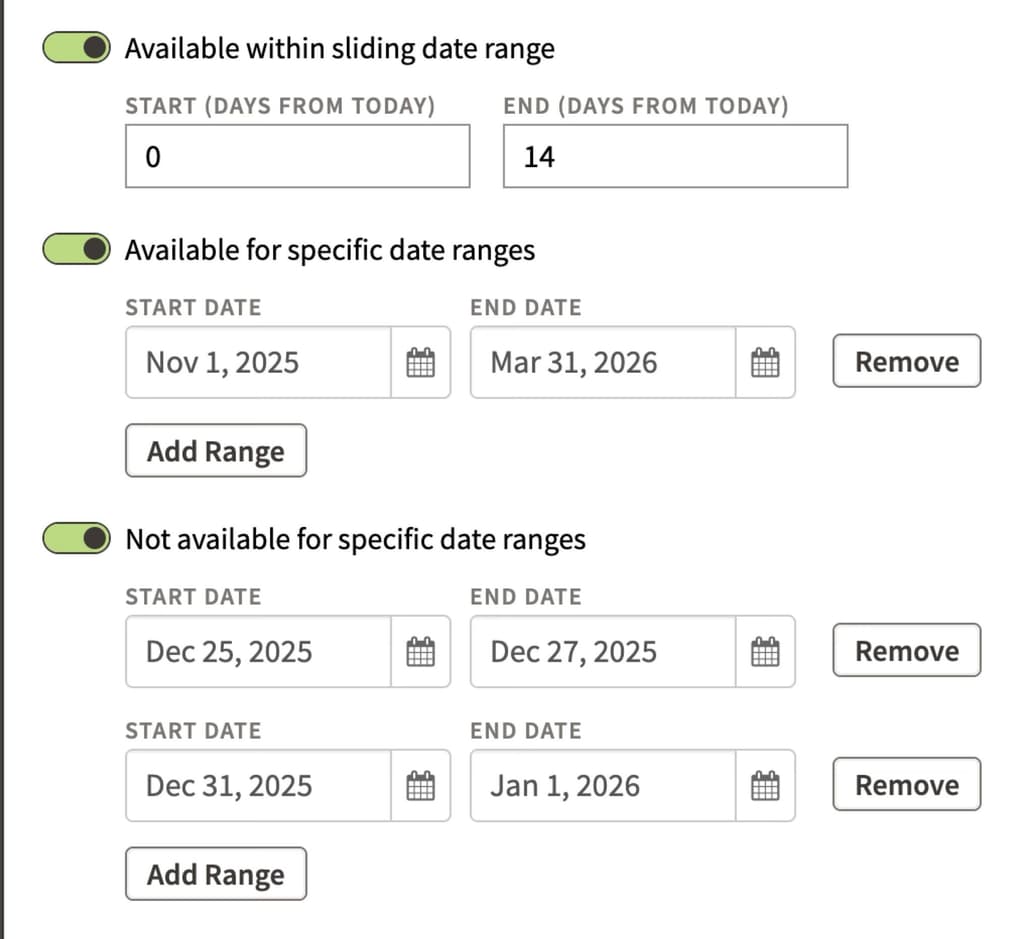
These tools are especially helpful for derived rates, where you want to apply availability rules that differ from those of the parent rate. This helps ensure cleaner calendars, fewer manual overrides, and rates that match your real strategy.
Cancellation Policies
Clear, consistent cancellation policies protect your revenue and help you avoid uncomfortable conversations with guests. Our new Cancellation Policies feature lets you define your rules once, then apply them automatically across your rate types.
You can create cancellation policies and attach them to specific rate types. When a reservation is cancelled, ThinkReservations automatically calculates the correct fee based on that policy and adds it to the bill, so your team does not have to do the math manually.
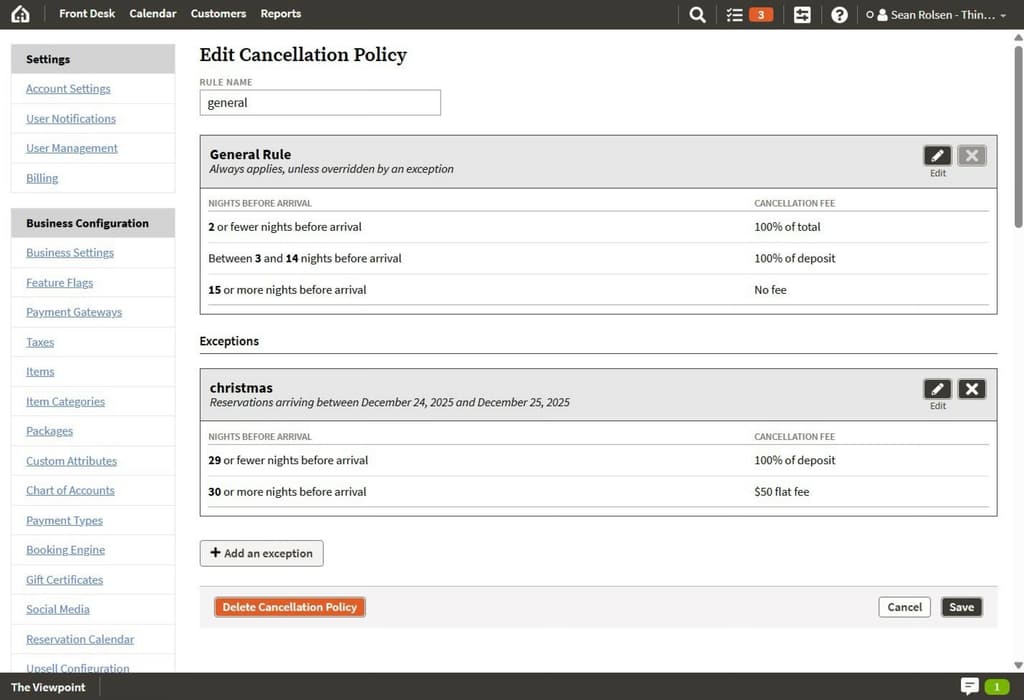
How it works for ThinkWeb + ThinkTravel:
- Guests with a ThinkTravel account can view and cancel eligible reservations online.
- If a rate type has a policy, the system applies the correct fee and processes any payments or refunds automatically.
- If no policy is set, the guest is prompted to call the property instead of cancelling online.
How it works with the legacy booking engine:
- Guests cannot cancel online.
- Your team cancels in the PMS, and the system still calculates and applies the right cancellation fee for you.
This keeps policies consistent, reduces manual work for your staff, and makes it much easier to stand behind your cancellation rules.
Media Library
Strong visuals sell your story long before a guest reads a word. Our new Media Library gives you a central home for your photos and other media right inside ThinkReservations, so you are not hunting through folders or desktops when you need the right image. You can upload your highest quality files once, and the system automatically resizes them for different uses, from your ThinkWeb site to image links in emails.
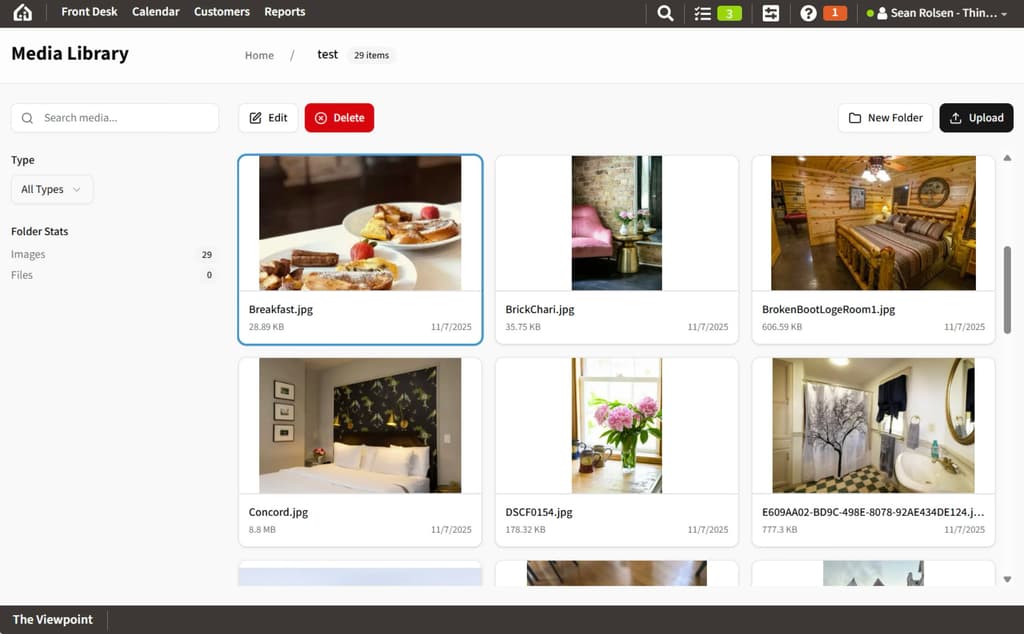
Alt text gets handled for you as well, using AI to generate accessible descriptions for each image. That means better usability, better SEO, and less time spent on tedious details, while your team always knows exactly where to find the visuals that represent your property best.
ThinkWeb Editor
The ThinkWeb Editor gives you more control over your website content without needing a designer every time you want to make a change. From inside ThinkReservations, you can open ThinkWeb and quickly adjust key parts of your site yourself.
With the ThinkWeb Editor, you can:
- Manage pages: Create, edit, duplicate, or remove pages, and update copy or layout where it matters most.
- Keep rooms in sync: Room photos and descriptions pull directly from your ThinkReservations Room settings, so your website stays aligned with your PMS.
- Publish with confidence: Make updates, preview them, then publish when you are ready so changes go live in a controlled way.
- Run your blog in one place: Draft, edit, and publish blog posts to support SEO, storytelling, and direct bookings.
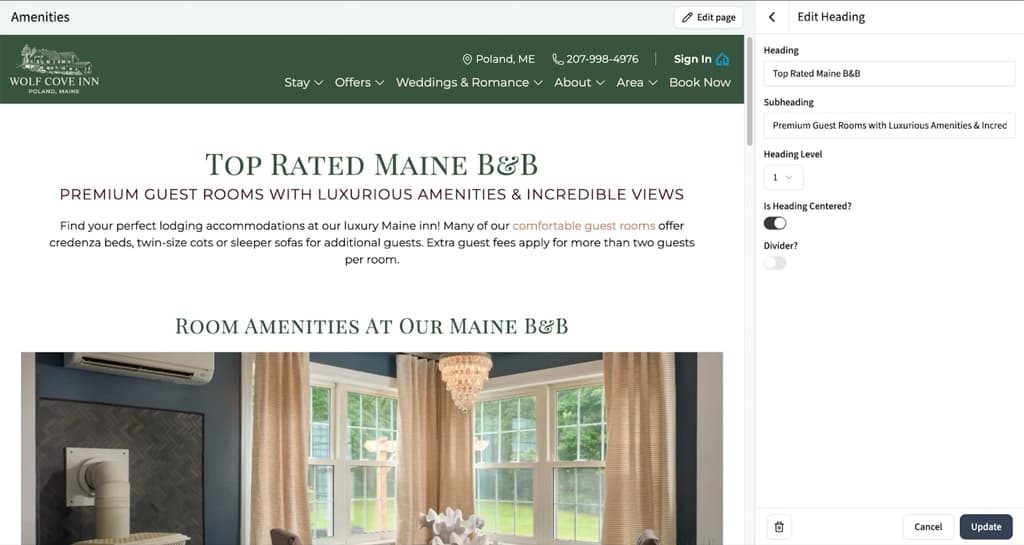
For bigger structural changes like headers, footers, or advanced components, our services team is still here to help, but day-to-day updates are now much easier to handle in-house.
Travel Insurance
Travel Insurance lets guests protect their trip by adding coverage during the online booking process. Once you enable it in your PMS settings, the option appears in the booking engine after the guest selects their state or region, ensuring only eligible travelers see it.
There is no cost to your property. Guests pay TravelSafe directly for the premium, and if they file a valid claim, TravelSafe reimburses the guest, not you. You still follow your own cancellation policy and keep the revenue outlined there.
This gives guests extra peace of mind and makes it easier for your team to enforce clear, consistent cancellation rules, while still giving you the flexibility to turn Travel Insurance on or off at any time.
Group Blocks & Group Booking Engine
Groups are great for revenue, but they can be tricky to manage if everything runs through email and phone calls. Group Blocks give you a simple way to hold and track rooms for weddings, conferences, retreats, and other events without endless manual coordination.
With Group Blocks, you can allocate specific rooms or room types to a group and set an optional cut-off date. Until that date, those rooms are reserved just for that group. After the cut-off, any unused rooms are automatically released back to general availability, so you are not leaving money on the table.
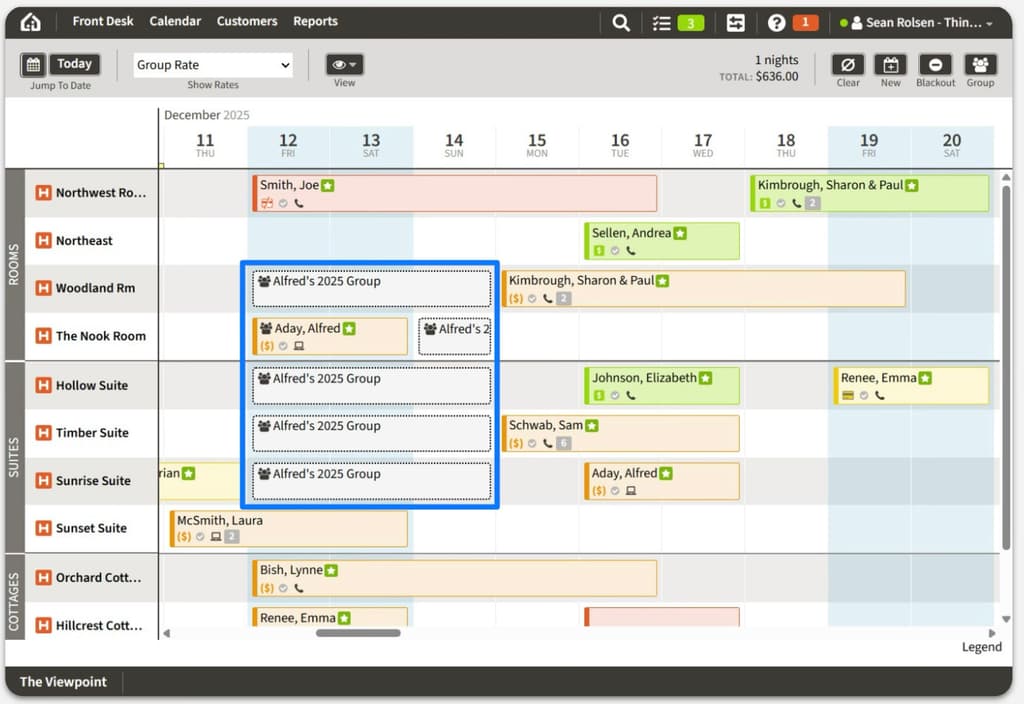
Your team can book directly into the block in the PMS using the New Reservation modal. Every reservation is tied back to the group, allowing you to quickly view pickup and remaining rooms.
The Group Booking Engine builds on this by letting guests book into the block themselves. It is not a separate booking engine. Instead, guests enter a unique group code on your existing booking engine, whether you use ThinkWeb or the legacy version, and see only the rooms and rates allocated to their group.
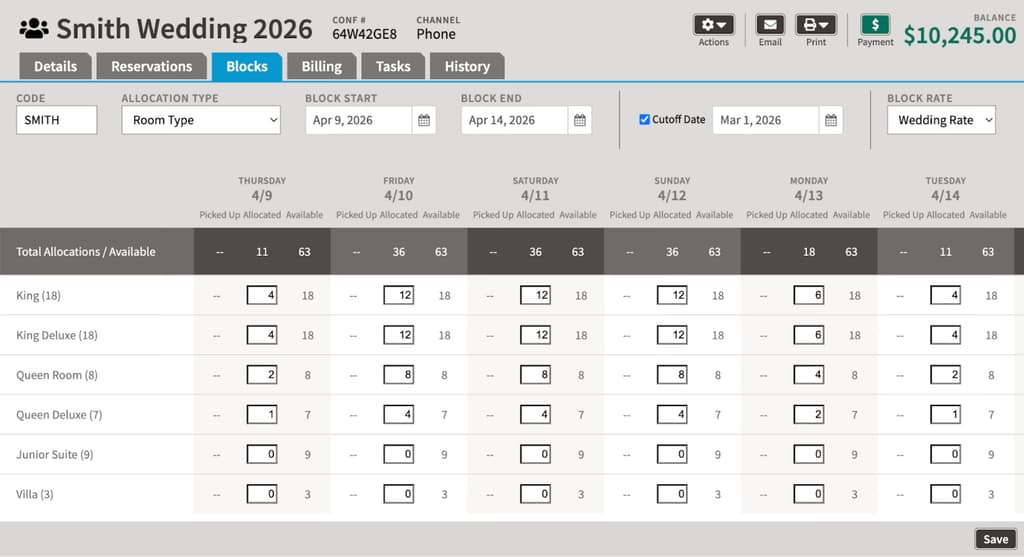
This results in fewer phone calls, less manual work for your staff, and a smoother booking experience for planners and guests alike.
ThinkAccounting
For many independent properties, the hardest part of running the business isn’t welcoming guests; it’s keeping up with the books. ThinkAccounting is an optional, add-on subscription service built in partnership with Specialized Accounting, a firm dedicated to hospitality.
With ThinkAccounting, you get a dedicated accounting team plus an online portal where you can securely upload receipts, review financial reports, and track key metrics. Your books are maintained using hospitality standards, so you can finally see things like labor margins, cost per occupied room, and OTA or credit card impact with real clarity.
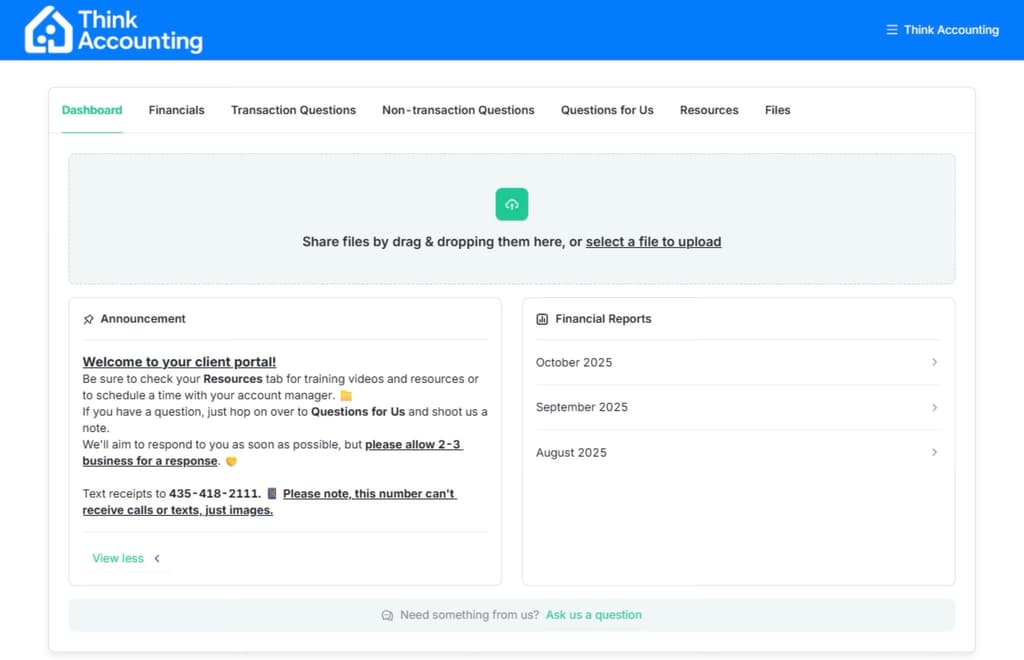
It is designed for properties that want expert-level financial insight without hiring a full in-house accounting staff, making it easier to make confident decisions about pricing, staffing, and long-term growth.
ThinkPayments
One last announcement that we are especially excited about, ThinkPayments, a new integrated payment solution powered by Stripe, is coming by February 2026! It is not available yet, but here is what you can expect.
ThinkPayments will:
- Support Apple Pay and Google Pay in the booking engine
- Offer Buy Now, Pay Later options like Affirm or Klarna, where guests pay over time, and you are paid upfront
- Authorize more international and local payment methods, reducing declines from foreign banks
- Support EMV chip terminals at the front desk
- Centralize payouts, reports, and dispute management inside ThinkReservations
This new feature gives independent properties modern, flexible payment options without adding extra systems or vendors to manage.